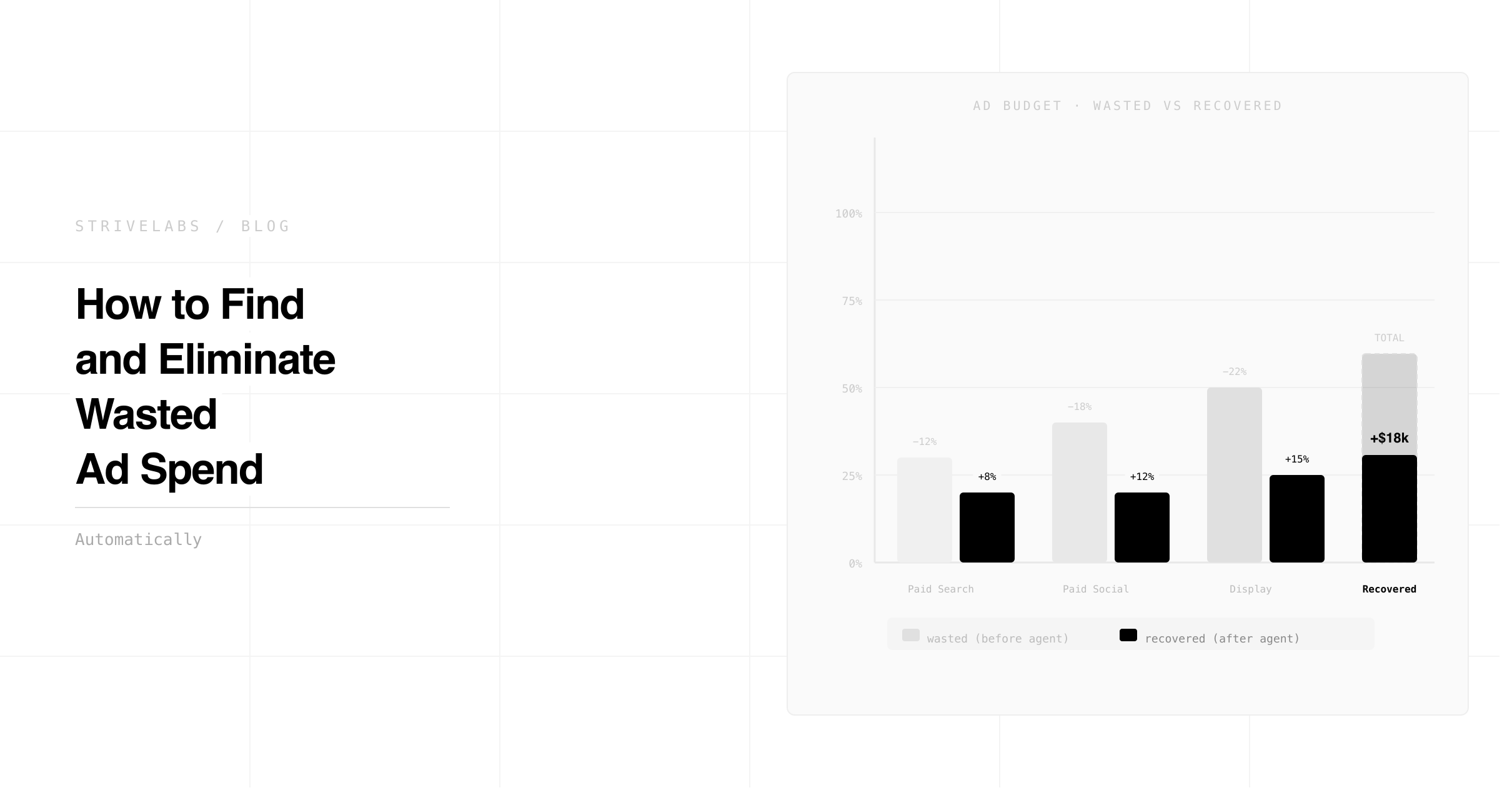
36.1% of B2B SaaS Google Ads spend is wasted. Across 43 enterprise accounts analysed by GrowthSpree, that averaged $11.3 million in recoverable budget sitting in campaigns that were generating clicks, generating MQLs, and generating zero pipeline.
The waste is not obvious. If it were, it would have been caught. It hides in three specific places that standard platform dashboards are structurally unable to see, contacts already in your pipeline still receiving awareness ads, campaigns generating MQL volume with zero opportunity conversion, and budget running during hours when your ICP is not on LinkedIn. None of these show up as failures on a Google Ads or LinkedIn dashboard. They only become visible when platform data is connected to HubSpot pipeline data.
That connection, between what the ad platform reports and what actually happens in HubSpot, is where AI agents for paid media generate their most immediate financial return. Not through better creative or smarter bidding. Through finding the spend that is structurally wasted before it compounds.
This post covers the five places wasted ad spend hides in B2B SaaS accounts, the pipeline test that finds the most expensive waste, and how Strivelabs' paid media agent detects all five types automatically across Google Ads, LinkedIn and Meta, with the marketer approving every reallocation before it executes.
At a Glance
-
Wasted ad spend hides in five specific places: in-pipeline waste, zero-pipeline campaigns, performance waste, audience overlap and attribution leakage. The first two are invisible without CRM data connected to ad platforms.
-
For a B2B SaaS company spending $15,000 per month on LinkedIn Ads, combined weekend and off-hours waste amounts to approximately $5,271 per month, 35% of total LinkedIn Ads budget, because LinkedIn Campaign Manager has no native dayparting feature and budgets fire 24/7.
-
The pipeline test, connecting campaign contacts to HubSpot opportunity outcomes to calculate true cost per opportunity, is the only diagnostic that surfaces the most expensive waste types.
-
Strivelabs' paid media agent reads Google Ads, LinkedIn and Meta data alongside HubSpot pipeline data continuously. It detects all five waste types automatically and queues suppression and reallocation recommendations for marketer approval. Nothing changes in the ad accounts without sign-off.
Where Wasted Ad Spend Hides in B2B SaaS Accounts
Standard ad platform dashboards measure what happens inside the platform. Clicks, impressions, CTR, CPL, conversion rate. These metrics are accurate as far as they go. The problem is where they stop.
A campaign that generates 50 MQLs at an acceptable CPL looks successful in Google Ads. If those 50 MQLs convert to opportunities at 2%, one opportunity, the campaign generated one opportunity at 50x the apparent CPL. The dashboard showed success. The pipeline showed waste.
This gap exists in every B2B SaaS marketing account running paid across multiple platforms without a live CRM connection. The platform does not know what happened to the lead after the form fill. HubSpot knows. Without connecting the two, budget allocation decisions are made on incomplete data every week.
Excluding students, freelancers, non-ICP seniority levels and sales/BD contacts from LinkedIn audiences alone eliminates 20-35% of wasted spend before the campaign runs. But most teams are not making these exclusions systematically because identifying which contacts in the audience should be excluded requires reading HubSpot data, and the ad platform does not have access to it without a deliberate integration.
The Five Types of Wasted Ad Spend — and How to Find Them
Type 1 — In-pipeline waste
A contact moves to Opportunity in HubSpot on Tuesday. Your LinkedIn awareness campaign keeps running against them on Wednesday because the audience sync runs weekly and has not updated yet. Your sales rep is in an active commercial conversation while your marketing campaign is showing the same contact a top-of-funnel brand awareness ad.
This does not just waste budget. It creates a dissonant buyer experience, the prospect is evaluating your product commercially while your marketing is still trying to introduce them to the category. Every B2B SaaS team running paid alongside an active sales motion has this problem. Most of them do not know how large it is because measuring it requires HubSpot stage data connected to ad platform audiences in real time.
For a team spending $15k per month on LinkedIn and Google Ads combined, in-pipeline suppression typically recovers 8-18% of spend, $1,200 to $2,700 per month, by eliminating impressions on contacts who should not be receiving awareness ads.
The Strivelabs AI agents for CRM post covers how pipeline stage changes in HubSpot trigger audience updates across paid platforms automatically. The paid media agent reads the HubSpot stage change, queues the audience suppression across Google Ads and LinkedIn, and presents the update for marketer approval before any audience changes.
Type 2 — Zero-pipeline campaigns
These are the most expensive waste type and the hardest to find without CRM data.
A campaign generates 40 MQLs per month at a $200 CPL. The paid media dashboard shows an acceptable cost metric. Leadership approves continued spend. Six months later, after one full B2B SaaS sales cycle, a pipeline attribution analysis shows that none of the 40 monthly MQLs from that campaign have converted to opportunities. The campaign has spent $72,000 in six months generating zero pipeline.
Without connecting campaign-level contacts to HubSpot opportunity records, this pattern is invisible for the entire six months. With the connection, it becomes visible within the first sales cycle.
The pipeline test in the next section covers exactly how to run this diagnostic. The Strivelabs paid media agent runs it automatically, comparing campaign MQL volume against opportunity creation rates and flagging campaigns where the contact-to-opportunity conversion rate falls below the account average.
Type 3 — Performance waste
Creative fatigue. Audience saturation. Off-hours spend. These are the waste types standard tools do catch, but only when someone is actively monitoring.
LinkedIn Campaign Manager has no native dayparting feature as of March 2026, budgets fire 24/7 with no day-of-week or time-of-day control. The CTR gap between Wednesday (2.03%) and Sunday (1.48%) is 27%, fewer people seeing the ads on weekends and a lower engagement rate among those who do. For a $15k monthly LinkedIn budget, weekend and off-hours spend wastes approximately $5,271 per month.
Creative fatigue follows a predictable pattern: CTR begins declining at a specific frequency threshold, conversion rate follows 1-2 weeks later, and CPC rises as the platform's quality score drops. Most teams catch this in the weekly dashboard review, which means the fatigue has been compounding for 5-7 days before anyone acts. The Strivelabs paid media agent detects the pattern on day two and queues a creative swap recommendation for approval before CPC rises.
Type 4 — Audience overlap and duplication
Running Google Ads, LinkedIn and Meta simultaneously without cross-platform audience coordination creates overlap that drives up costs and makes attribution unreliable. The same contact sees awareness ads on LinkedIn, retargeting ads on Meta and search ads on Google, with each platform claiming credit for the conversion.
This is not just a waste problem. It is an attribution problem. When the same contact converts after seeing ads on three platforms, each platform claims 100% credit. The total attributed conversions exceed the actual conversions. Budget decisions made on these inflated attribution numbers systematically over-invest in paid channels.
Type 5 — Attribution leakage
Attribution leakage occurs when a conversion in the ad platform does not appear in HubSpot. Missing GCLIDs, broken UTM conventions, form submissions that do not create HubSpot contacts, lead routing rules that drop contacts before they reach a deal stage. The result: campaigns that are generating pipeline appear to be underperforming because the pipeline data is not reaching the attribution model.
Teams that miss attribution leakage make the opposite error from the zero-pipeline waste problem, they cut campaigns that are actually working because the reporting does not show the pipeline they are generating.
Why Manual Audits Miss Most Wasted Ad Spend
Three specific reasons manual weekly checks fail to catch the most expensive waste:
The CRM connection does not exist. A paid media manager reviewing Google Ads and LinkedIn dashboards on a Friday morning is looking at platform data that has no visibility into what happened to the leads after the form fill. Without connecting campaign IDs to HubSpot opportunity records, Types 1 and 2, in-pipeline waste and zero-pipeline campaigns, are structurally invisible regardless of how carefully the dashboard is reviewed.
The feedback loop is too slow. A campaign starts generating zero-pipeline MQLs in January. The manual attribution analysis that would reveal this happens in the quarterly review in March. Two months and the equivalent budget in waste has already run. In a 90-day B2B SaaS sales cycle, monthly manual reviews are the minimum viable cadence. Weekly is better. Continuous is the only approach that catches performance waste before it compounds.
The diagnostic requires cross-platform data that does not naturally align. Google Ads uses GCLIDs. LinkedIn uses lead gen form IDs. Meta uses pixel events. HubSpot uses contact records with UTM parameters. Joining these four data sources to run the pipeline test manually requires technical work that most lean marketing teams do not have capacity for every week.
Better decisions start with better infrastructure.
Most mid-market teams pick a channel and hope. Strivelabs gives you the data to know, and the infrastructure to act on it.
Book a Demo →
The Pipeline Test — the Only Wasted Ad Spend Check That Matters
The pipeline test connects campaign-level contacts to HubSpot opportunity outcomes and calculates the true cost per opportunity for every campaign. It is the only diagnostic that surfaces in-pipeline waste and zero-pipeline campaigns, the two most expensive waste types.
How to run it:
Step 1 — Pull campaign-level contacts from Google Ads, LinkedIn and Meta using UTM parameters or click IDs. Every campaign should have a distinct UTM convention that creates a readable source in HubSpot.
Step 2 — In HubSpot, filter contacts by campaign source and calculate the contact-to-opportunity conversion rate for each campaign over the last 90 days. This requires that UTM data is flowing correctly into HubSpot contact records.
Step 3 — Calculate cost per opportunity for every campaign: total campaign spend ÷ opportunities created. Sort by cost per opportunity, highest to lowest.
Step 4 — Any campaign with zero opportunities created in 90 days is a zero-pipeline campaign, flag it regardless of MQL volume or CPL. Any campaign where cost per opportunity is more than 3x the account average is a candidate for budget reallocation.
Step 5 — Cross-reference the audience list for every active campaign against your HubSpot Opportunity and Deal stages. Any contact in Opportunity or later who is still in an awareness campaign audience is in-pipeline waste — suppress them before the next impression.
What to do with the results:
Zero-pipeline campaigns: pause, redirect budget to campaigns with positive opportunity creation rates, and investigate whether the MQL definition for that campaign aligns with ICP.
High cost-per-opportunity campaigns: reduce budget, tighten audience targeting, test new creative against the current control.
In-pipeline waste: suppress immediately across all platforms. Set up automated suppression that updates within 24 hours of a HubSpot stage change.
How Strivelabs' Paid Media Agent Eliminates Wasted Ad Spend Automatically
The pipeline test describes exactly what the Strivelabs paid media agent runs on a continuous basis, not quarterly, not weekly, every day.
In-pipeline waste detection: The agent reads HubSpot deal stages continuously. When a contact moves to Opportunity it generates an audience suppression recommendation across Google Ads and LinkedIn simultaneously, before the next impression fires. The recommendation includes the audience size, the estimated monthly spend recovery, and the reasoning. The marketer approves. The suppression executes. Nothing changes in the ad accounts without sign-off.
Zero-pipeline campaign detection: The agent reads campaign-level contacts from Google Ads, LinkedIn and Meta and connects them to HubSpot opportunity records. When a campaign's contact-to-opportunity conversion rate falls below the account average for 30 consecutive days, the agent flags it as a zero-pipeline campaign. It generates a budget reallocation recommendation, how much budget to shift, where to shift it, and which campaigns have positive opportunity creation rates that justify the reallocation. The marketer reviews the pipeline attribution data and approves or adjusts.
Performance waste detection: The agent monitors CTR, frequency, CPC and creative performance across all three platforms daily. When creative fatigue patterns emerge, CTR declining at a specific frequency threshold, it generates a creative swap recommendation before CPC rises. When off-hours spend is running against an audience that is not converting after business hours, it flags the pattern and recommends budget pacing adjustments.
Attribution leakage monitoring: The agent checks GCLID capture rates, UTM parameter coverage and HubSpot contact creation from ad conversions weekly. When attribution leakage is detected, campaigns spending but not generating HubSpot contacts, it surfaces the technical issue with a diagnosis before the campaign data becomes unreliable.
The marketer's weekly paid media review becomes a 20-minute approval session rather than a four-hour manual audit. The agent has already found the waste, quantified it, diagnosed the cause and recommended the fix. The marketer reads the diagnosis, agrees or adjusts, and approves.
What Happens When Wasted Ad Spend Is Caught in Hours Not Weeks
The financial case is straightforward.
A team spending $30k per month across Google Ads and LinkedIn with 36.1% average waste — the GrowthSpree benchmark — has $10,830 per month in recoverable budget. Over 12 months, that is $129,960 in budget that could fund three additional experiments per week, a new channel test, or direct pipeline investment.
The compound effect matters more than the monthly saving. A team that catches in-pipeline waste on day one instead of day seven runs seven days fewer of wasted impressions on in-pipeline contacts per cycle. A team that identifies a zero-pipeline campaign in month one instead of month three recovers two months of misdirected budget before the quarterly review.
The closed loop marketing architecture, connecting every marketing action back to HubSpot pipeline data, is what makes this detection possible at speed. The Agentic Marketing Engine is what makes it continuous.
The marketing engineer function, delivered as software.
See how Strivelabs gives mid-market teams the operational capacity without the hiring cost.
Explore Strivelabs →
Frequently Asked Questions (FAQs)
What is wasted ad spend in B2B SaaS paid media?
Wasted ad spend is budget allocated to campaigns that are not generating pipeline — either because they are targeting contacts already in active sales stages (in-pipeline waste), generating MQL volume with zero opportunity conversion (zero-pipeline campaigns), running creative that has fatigued beyond effective engagement, overlapping audiences across platforms, or leaking attribution through broken UTM and GCLID tracking. The average B2B SaaS Google Ads account wastes 36.1% of spend, according to GrowthSpree's analysis of 43 accounts.
How do I find wasted ad spend without a technical setup?
Start with the pipeline test: export campaign-level contacts from Google Ads and LinkedIn using UTM parameters, match them to HubSpot opportunity records, and calculate the contact-to-opportunity conversion rate per campaign over the last 90 days. Any campaign with zero opportunities in 90 days is a zero-pipeline campaign regardless of MQL volume. Any contact in Opportunity or later stage who is still in an awareness campaign audience is in-pipeline waste — suppress them immediately.
How does LinkedIn audience suppression reduce wasted spend?
When a contact moves to Opportunity in HubSpot, they should be removed from awareness campaign audiences on LinkedIn and Google Ads. Without this suppression, awareness ads continue running against contacts who are already in commercial discussion with your sales team — wasting budget and creating a dissonant buyer experience. For a team spending $15k per month on LinkedIn, proper suppression typically recovers 8-18% of spend per month.
What is the difference between a zero-pipeline campaign and an underperforming campaign?
An underperforming campaign generates some pipeline but at above-average cost per opportunity — it is worth optimising. A zero-pipeline campaign generates MQL volume but zero HubSpot opportunities over a 90-day window — it should be paused and the budget reallocated regardless of platform metrics. The distinction requires CRM data connected to campaign attribution. Without it, a zero-pipeline campaign looks identical to a standard campaign on a platform dashboard.
How does Strivelabs' paid media agent detect wasted ad spend?
Strivelabs connects to Google Ads, LinkedIn Ads, Meta and HubSpot via OAuth. The paid media agent reads HubSpot pipeline data and ad platform performance data simultaneously. It detects in-pipeline waste by identifying contacts in active deal stages who are still in awareness audiences. It detects zero-pipeline campaigns by tracking contact-to-opportunity conversion rates per campaign over 30-day rolling windows. Every detection generates a specific recommendation — audience suppression, budget reallocation, creative swap — queued for marketer approval before any changes execute.